I am interested in making my website go from worse than highschool project to nice website. Here I will literally code the animations and stuff on wordpress. For me this is a bit hard because I have not coded in 5 years, and I forgot everything. Today I´ll explore wordpress code.
Changing the width of the website.
One thing that I dislike is the fact that the text DOES NOT cover all of the page. It is centered but it leaves a huge space
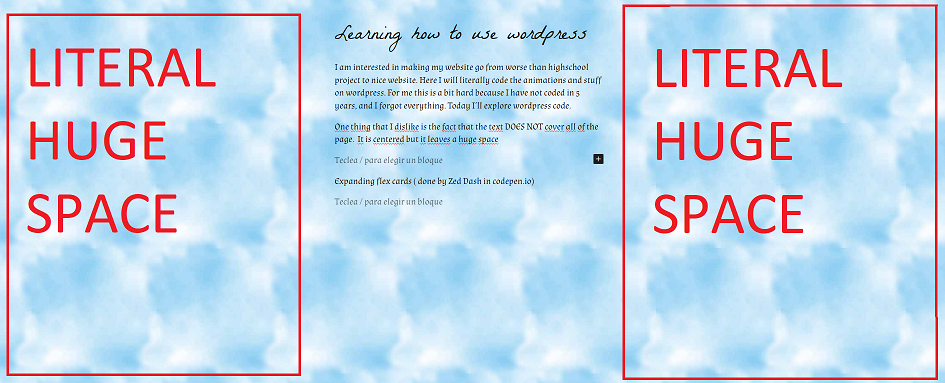
Like, it pisses me off sometimes because its too much. Dear reader, I was for an hour doing el polla trying to change the width in the content area… it is in the Appearance –> Editor –> STYLE –> Layout –> Content width /Wide width area where I could change that.
So you can change it in the wide width and padding.
WordPress 1 – me 0
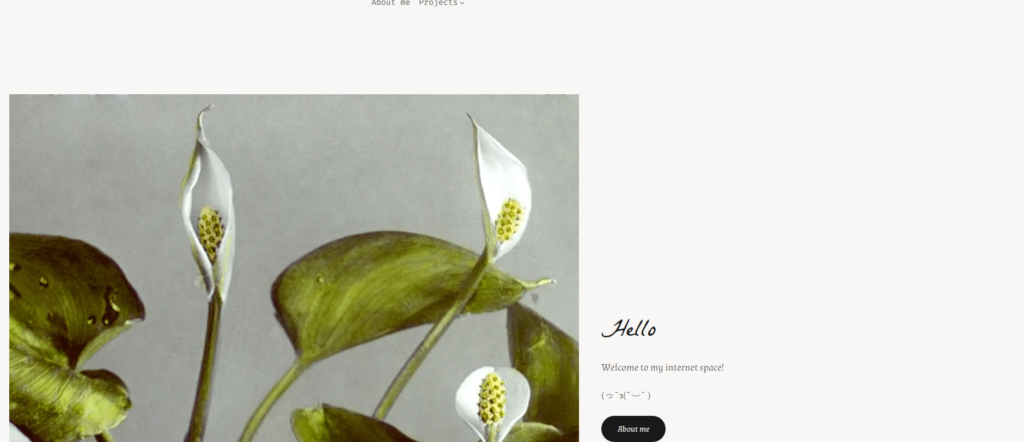
But I have an issue now, because it only changed in the main page and the other pages basically disregarded.
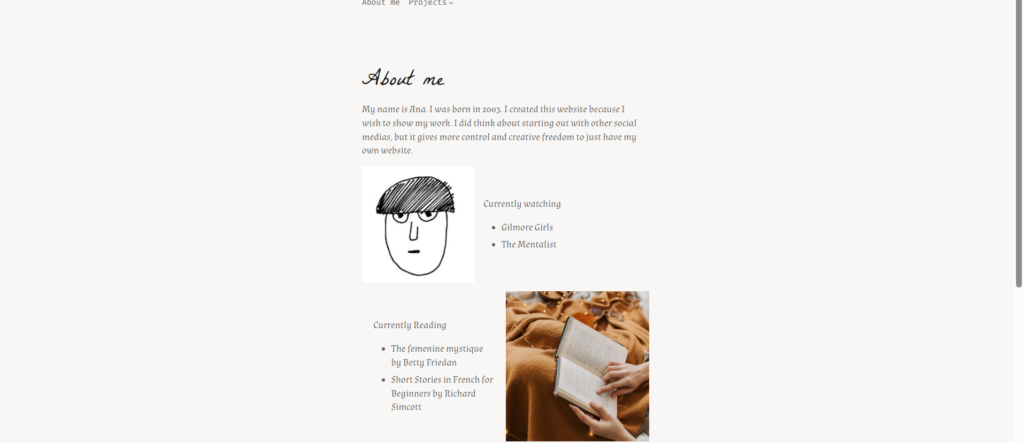
This is because, i have no idea. But I changed it manually. It is as simple as clicking and changing the width from the block.

and then you choose between these 3:
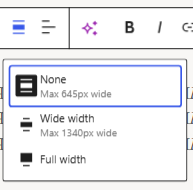
none :AAAAAAAAAAAAAAAAAAAAAAAAAAAAAAAAAAAAAAAAAAAAAAAAAAAAAAAAAAAAAAAAAAAAAAAAAAAAAAAAAAAAAAAAAAAAAAAAAAAAAAAAAAAAAAAAAAAAAAAAAAAAAAAAAAAAAAAAAAAAAAAAAAAAAAAAA
Wide width:AAAAAAAAAAAAAAAAAAAAAAAAAAAAAAAAAAAAAAAAAAAAAAAAAAAAAAAAAAAAAAAAAAAAAAAAAAAAAAAAAAAAAAAAAAAAAAAAAAAAAAAAAAAAAAAAAAAAAAAAAAAAAAAAAAAAAAAAAAAAAAAAAAAAAAAAAAAAAAAAAAAAAAAAAAAAAAAAAAAAAAAAAAAAAAAAAAAAAAAAAAAAAAAAAAAAAAAAAAAAAAAAAAAAAAAAAAAAAAAAAAAAAAAAAAAAAAAAAAAAAAAAAAAAAAAAAAAAAAAAAAAAAAAAAAAAAAAAAAAAA
Full width: AAAAAAAAAAAAAAAAAAAAAAAAAAAAAAAAAAAAAAAAAAAAAAAAAAAAAAAAAAAAAAAAAAAAAAAAAAAAAAAAAAAAAAAAAAAAAAAAAAAAAAAAAAAAAAAAAAAAAAAAAAAAAAAAAAAAAAAAAAAAAAAAAAAAAAAAAAAAAAAAAAAAAAAAAAAAAAAAAAAAAAAAAAAAAAAAAAAAAAAAAAAAAAAAAAAAAAAAAAAAAAAAAAAAAAAAAAAAAAAAAAAAAAAAAAAAAAAAAAAAAAAAAAAAAAAAAAAAAAAAAAAAAAAAAAAAAAAAAAAAAAAAAAAAAAAAAAAAAAAAAAAAAAAAAAAAAAAAAAAAAAAAAAAAAAAAAAAAAAAAAAAAAAAAAAAAAAAAAAAAAA
Differences appear bigger on laptop and tablet, with no difference in mobile.
Expanding flex cards (not finished)
So I am going to follow the code of Zed Dash. He did the HTML, CSS and JS. Link to the original code here.
now my mission is to move it to understand it and move it to my website in wordpress.
So it is really nice that in the “Custom HTML” block, I only need HTML, CSS and JS as well, and it is divided.
So the HTML is the following
<div class="options">
   <div class="option active" style="--optionBackground:url(https://66.media.tumblr.com/6fb397d822f4f9f4596dff2085b18f2e/tumblr_nzsvb4p6xS1qho82wo1_1280.jpg);">
      <div class="shadow"></div>
      <div class="label">
         <div class="icon">
            <i class="fas fa-walking"></i>
         </div>
         <div class="info">
            <div class="main">Blonkisoaz</div>
            <div class="sub">Omuke trughte a otufta</div>
         </div>
      </div>
   </div>
   <div class="option" style="--optionBackground:url(https://66.media.tumblr.com/8b69cdde47aa952e4176b4200052abf4/tumblr_o51p7mFFF21qho82wo1_1280.jpg);">
      <div class="shadow"></div>
      <div class="label">
         <div class="icon">
            <i class="fas fa-snowflake"></i>
         </div>
         <div class="info">
            <div class="main">Oretemauw</div>
            <div class="sub">Omuke trughte a otufta</div>
         </div>
      </div>
   </div>
   <div class="option" style="--optionBackground:url(https://66.media.tumblr.com/5af3f8303456e376ceda1517553ba786/tumblr_o4986gakjh1qho82wo1_1280.jpg);">
      <div class="shadow"></div>
      <div class="label">
         <div class="icon">
            <i class="fas fa-tree"></i>
         </div>
         <div class="info">
            <div class="main">Iteresuselle</div>
            <div class="sub">Omuke trughte a otufta</div>
         </div>
      </div>
   </div>
   <div class="option" style="--optionBackground:url(https://66.media.tumblr.com/5516a22e0cdacaa85311ec3f8fd1e9ef/tumblr_o45jwvdsL11qho82wo1_1280.jpg);">
      <div class="shadow"></div>
      <div class="label">
         <div class="icon">
            <i class="fas fa-tint"></i>
         </div>
         <div class="info">
            <div class="main">Idiefe</div>
            <div class="sub">Omuke trughte a otufta</div>
         </div>
      </div>
   </div>
   <div class="option" style="--optionBackground:url(https://66.media.tumblr.com/f19901f50b79604839ca761cd6d74748/tumblr_o65rohhkQL1qho82wo1_1280.jpg);">
      <div class="shadow"></div>
      <div class="label">
         <div class="icon">
            <i class="fas fa-sun"></i>
         </div>
         <div class="info">
            <div class="main">Inatethi</div>
            <div class="sub">Omuke trughte a otufta</div>
         </div>
      </div>
   </div>
</div>

<a href="http://victorofvalencia-blog.tumblr.com" target="_blank" class="credit">Photos from Victor of Valencia on tumblr</a>
Ok, so I am going to check the “Custom HTML” from wordpress.
HTML
<h1>ABC</h1>CSS
h1{
color:blue
}
ABC
So, honestly I do not get half of what he did so I´ll try to do the same idea from scratch in my own way,
So first, I think that if I figure it out with 3, I can figure it out with more afterwards. This way I simplify the code for myself.
Ok. So first I learned how to put images in colums.



So I started it out, but I don´t feel like I have been making real profress in learning by just trying to make a project. SO, I have decided to stick to basics for next week.
Thank you for reading!